Ariens Deluxe 24 921069 Auger Keeps Spinning After Release: Interlock or Clutch/Brake?
Separate normal dual-handle interlock behavior from an attachment that still rotates after both clutch levers are released, then use Ariens' 5-second stop limit and clutch/brake checks.
Applies to Deluxe 24 (921069)
Identifiers: 921069 · Deluxe 24
Engine ID: Ariens AX 252cc current specification — verify engine label for parts
Guide scope: Applies to Ariens Deluxe 24 model 921069 serial 000101+ under operator manual 30219300A. The dual-handle interlock intentionally lets the auger continue while traction remains engaged; this guide diagnoses continued rotation after both clutch levers are released or a stop time beyond the manual limit.
Operator manual 30219300A identifies model 921069 serial 000101+. Current Ariens product data lists AX 252cc; keep the serial number and engine label with the machine before engine-specific parts.
Normal dual-handle interlock vs. a real no-stop fault
On 921069, releasing the attachment lever alone can leave the auger turning while the traction lever remains held; that is the designed interlock. Treat it as a fault only when both levers are released and the attachment still does not stop within Ariens’ 5-second limit.
On 921069, continued auger rotation can be normal only while the traction lever is still holding the dual-handle interlock. Once both clutch levers are released, Ariens requires the auger/impeller to stop within 5 seconds. A longer stop or continued drive belongs to the attachment-clutch/brake adjustment path.
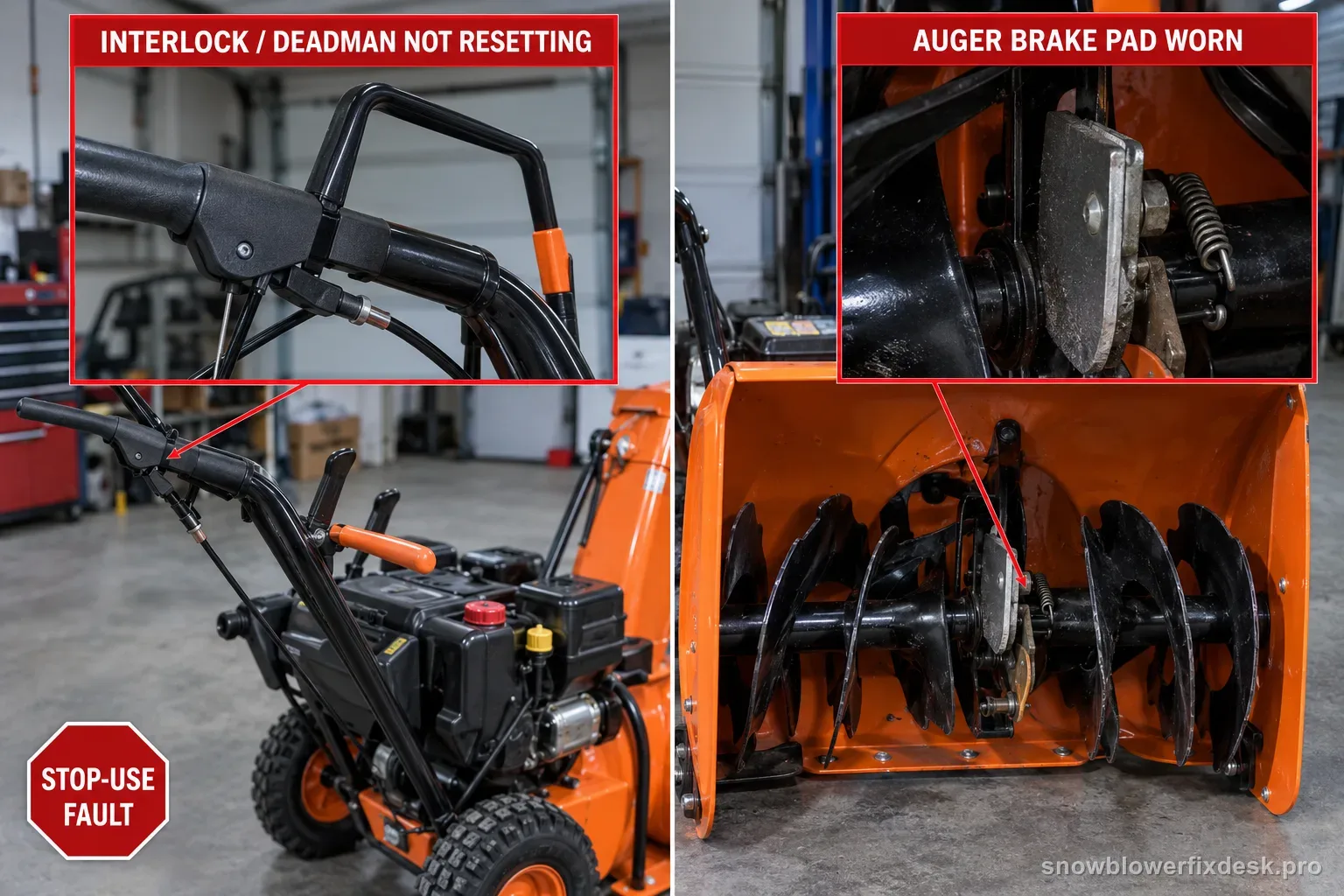
Treat an auger that does not stop after both clutch levers are released as a stop-use fault. Shut the engine off, remove the key, wait for all motion to stop and disconnect the spark-plug wire before clutch, brake, cable or belt inspection.
Diagnostic sequence
Work in order. The early checks are intentionally low-disassembly and model-specific; stop once the symptom changes or the fault is confirmed.
Release both clutch levers before calling it a fault
Why this check: The 921069 dual-handle interlock intentionally keeps the attachment clutch engaged after the attachment lever is released if the traction lever is still held.
What to do: In an open area, confirm whether the auger continues only while the traction lever remains engaged. Release both levers before judging stop behavior.
What the result means: If the auger stops after the traction lever is released, the observed behavior may be the normal interlock rather than a stuck attachment clutch.
Use the 5-second auger stop limit
Why this check: Ariens gives a specific clutch-operation requirement for this model family instead of a subjective “eventually stops” standard.
What to do: From the operator position and with no bystander near the discharge path, release both levers and observe the auger/impeller. If it does not stop within 5 seconds, stop using the machine until corrected.
What the result means: A stop time beyond 5 seconds sends the diagnosis to attachment clutch/brake adjustment or repair.
Verify the attachment lever and cable return freely
Why this check: Ice, a damaged cable or a control that cannot return can hold tension in the attachment system and mimic an internal brake problem.
What to do: With the engine off and machine disabled, clear external ice and inspect the lever/cable path for obvious binding, kinks or a return problem. Do not shorten the cable before confirming free control movement.
Check attachment-cable slack at the manual baseline
Why this check: Ariens begins the adjustment by removing excess slack, but the cable setting must still allow the clutch and brake to disengage correctly.
What to do: Follow the 30219300A attachment-clutch procedure exactly. With the attachment disengaged, verify the idler-arm relationship described by the manual before moving to roller or brake checks.
Check idler-arm roller clearance
Why this check: The manual specifies the engaged roller position as part of attachment-clutch geometry; a cable-only adjustment that leaves this relationship wrong is not complete.
What to do: Use the matched service position and measure the roller-to-frame clearance specified in 30219300A. Adjust only within the manual procedure and recheck after tightening hardware.
Check attachment brake contact and release clearance
Why this check: The brake must contact the attachment belt or pulley when disengaged and clear it when engaged. A brake that cannot apply cleanly can leave the auger driving after release.
What to do: With the machine safely disabled, inspect the brake pad relationship described in the manual. If the specified brake and idler ranges cannot both be achieved, stop adjustment and use Ariens service.
Check belt-finger clearance before condemning the brake
Why this check: The same attachment adjustment section includes belt-finger clearance; incorrect belt control can change how the attachment belt behaves during release.
What to do: Verify the belt finger is inside the manual clearance range and does not contact the belt when engaged. Do not bend or reposition unrelated guides by guess.
Escalate if the specified ranges cannot coexist
Why this check: Ariens explicitly sends the machine to repair if the adjustment cannot be brought into specification.
What to do: Do not keep shortening the cable or increasing brake drag. Record model 921069, serial, measured stop time and which clearance would not meet spec for dealer/service diagnosis.
How to read this symptom on this model
This symptom starts with an easy-to-miss operating distinction: the 921069 dual-handle interlock is designed to keep the attachment clutch engaged after the operator releases the attachment lever, as long as the traction lever is still held. That behavior is not the same as an auger that refuses to disengage. The first test therefore uses both controls, not just the lever the owner normally associates with the auger.
Once both levers are released, the interpretation changes completely. Ariens gives a hard safety requirement: the auger/impeller must stop within five seconds. That creates a clean boundary between normal interlock behavior and a clutch/brake fault. A machine that passes the interlock explanation but fails the five-second stop test should be taken out of snow-clearing service until the release system is corrected.
Do not begin by shortening the attachment cable. A lever that is packed with ice, a cable that cannot return freely or external damage can hold the system engaged regardless of the internal clutch/brake geometry. With the engine stopped and ignition disabled, confirm the control returns normally and the cable route is not visibly kinked, trapped or damaged before changing its adjustment.
The 30219300A procedure treats cable slack as only the first geometric check. It then moves to the attachment idler arm and specifies an engaged roller-to-frame clearance. That relationship matters because cable tension, idler position and brake behavior interact. A repair that makes the cable feel tighter but pushes the idler outside the specified range is not a successful adjustment.
The attachment brake is the most directly relevant component once the auger will not stop. Ariens says the brake pad must contact the attachment belt or pulley when the clutch is disengaged, and it must have clearance when the clutch is engaged. The manual also requires a minimum engaged gap. This is why visible pad contact and measured release geometry are more useful than guessing whether a spring “looks weak.”
Belt-finger clearance belongs in the same diagnosis because it controls belt behavior around the pulley. Ariens specifies that the belt finger opposite the idler be close to, but not touching, the belts when engaged. If the belt is being guided incorrectly during release, simply increasing brake pressure can mask the actual belt-control problem and create premature wear.
A second clue comes from symptom direction. The existing 921069 auger-not-turning page covers failure to transmit attachment power: shear bolts, frozen impeller, belt slip and clutch engagement. The opposite failure is power that remains after the operator has commanded release. Keeping those two intents separate prevents a belt or cable adjustment meant to improve engagement from being applied blindly to a disengagement fault.
The correct endpoint is not “the auger seems better.” Reassemble the machine, test from the operator position, release both controls and verify the attachment stops inside five seconds. Also confirm the auger still engages normally. If the specified ranges cannot coexist or the stop-time requirement remains out of bounds, Ariens directs the owner toward repair rather than indefinite adjustment.
Before you order parts
Before ordering a cable, prove the control lever returns freely and measure the actual stop time after both levers are released. A normal interlock event while traction remains held does not require a cable at all.
Before ordering a brake pad or belt, use the matched 30219300A geometry: cable baseline, idler-arm roller clearance, brake contact/clearance and belt-finger clearance. The failed measurement should drive the parts decision.
Do not buy legacy Deluxe 24 clutch parts from a visually similar 921024/921045 procedure. Keep the repair scoped to model 921069 serial 000101+ and operator manual 30219300A.
If adjustment cannot bring the clutch and brake into the specified ranges together, stop buying incremental hardware and move to Ariens service with the measurements.
Back to the exact model hub →Retest without creating a second problem
Retest in an open area with no snow load first. Engage the auger deliberately, then engage traction so the interlock can be observed. Release the attachment lever while traction remains held and confirm the expected interlock behavior before releasing traction too.
After both levers are released, count or time the attachment stop. The pass condition is within five seconds. Do not use throwing distance or engine sound as a substitute for the stop-time result.
Repeat the test only after the machine is fully reassembled and guards are back in place. If the auger stops correctly but engagement has become hesitant or the belt squeals, the adjustment has created a new symptom and needs correction.
If the attachment still drives beyond five seconds, end the retest. Record which clearance was out of range and whether the failure occurs from cold start or after warm operation, then use the service path instead of another aggressive cable change.
Make sure this is the right symptom
The same search phrase can lead to a different branch on another machine. Compare the nearest model-specific examples: Husqvarna ST 224 family (970528602 / 961930096): auger keeps spinning after control lever release · Toro Power Clear 721 E (38753): rotor keeps spinning after control bar release.
Model-specific notes
- The most important distinction is the dual-handle interlock: releasing the attachment lever alone does not necessarily command an immediate stop while the traction lever is still held.
- Ariens states that the auger/impeller must stop within 5 seconds when the attachment clutch is released; use that as a safety threshold, not a performance target to “tune around.”
- If the 921069 auger will not turn at all, use the separate auger-not-turning diagnosis. That is a failure to engage or transmit drive; continued rotation after release is a failure to disengage.
- Do not copy legacy Deluxe 24 cable dimensions or brake settings into model 921069. Use the current 30219300A procedure for this machine.
- If both levers are released and the attachment keeps driving, do not clear another pass of snow to see whether it improves as the machine warms.
Questions people get wrong on this model
Why does the Ariens Deluxe 24 auger keep spinning when I let go of the right-hand auger lever?
On model 921069, that can be normal if the traction lever is still held. Ariens uses a dual-handle interlock that keeps the attachment clutch engaged until the traction lever is also released. Judge the fault only after both levers are released; then the auger/impeller must stop within the manual's 5-second limit.
How long can the 921069 auger keep turning after both levers are released?
Ariens says the auger/impeller must stop within 5 seconds when the attachment clutch lever is released. If both controls are released and rotation continues beyond that limit, stop using the machine and move to the matched attachment clutch/brake procedure rather than accepting the coast-down as normal.
Should I tighten the attachment cable more if the auger will not stop?
Not automatically. Cable tension is only one part of the 921069 clutch/brake geometry. The manual also checks idler-arm roller clearance, brake contact/clearance and belt-finger position. Repeatedly shortening the cable can improve engagement while making disengagement worse, so use the complete procedure rather than a “tighter is better” adjustment.
When should I stop adjusting and take the Ariens to a dealer?
Stop when the specified clutch/brake clearances cannot be brought into range together, the control or cable is damaged, or the auger still exceeds the 5-second stop limit after the documented procedure. Take the model, serial number, measured stop time and the failed clearance result to service instead of continuing to increase cable tension.
Primary-source trail
Manufacturer material used for this diagnosis. Verify the model/serial range before ordering parts or applying an adjustment.
Ariens Deluxe Series Operator Manual 30219300AModels 921069–921072; troubleshooting and adjustment tables.apache.ariens.com →Ariens Deluxe 24 current product page — model 921069Official current Deluxe 24 page identifies model 921069 and the current Ariens AX 252cc specification.www.ariens.com →Ariens manuals lookupOfficial model-and-serial manual resolver. Use it as the stable path if a deep PDF URL changes.www.ariens.com →